To search
Softonic Rating:
Very good810
License:
Evaluation
Added:
April 11, 2007
Updated:
October 9, 2007
Publisher:
Website
File size:
5.2 MB
Downloads:
198

“The best way to take screenshots on Mac OS X”

QuickSnap is an easy-to-use and intuitive screenshot utility for Mac OS X which lets you take screenshots of your screen, a selection or a window and save them to a file in a format of your choice.

QuickSnap includes many features to make the task of taking screenshots easier and faster. Built-in options for filenames, formats, turning sounds on and off, and more are easily accessible. With timed screenshots, hot keys and a status menu, QuickSnap is an excellent replacement for Apple's Grab utility and Ambrosia's Snapz Pro.

Features:

Screenshot modes

Take screenshots of your screen, a selection, window and even individual icons.

You're in control

Change the name of screenshots, the format they are saved in, where they are saved and so on.

Timed screenshots

Time screenshots to prepare the perfect capture.

Customize your capture

Customize how your screenshots are taken.

Hot Keys

Access QuickSnap anytime with keyboard shortcuts.

Status menu

Access QuickSnap from anywhere on your menubar.

DVD Player

Take screenshots of your favorite movies.

Interface

Easy-to-use and polished interface for your convenience.

Languages:

English

Recent changes in QuickSnap:

  • Added Italian localization

Limitations:

Option to hide capture window is disabled

OS requirements for QuickSnap:

  • OS: Mac OS X

Minimum requirements:

  • Processor: PPC/Intel MHz
  • Mac OS X 10.4 or later

Featured program

Softonic gives special recognition to software of exceptionally high quality. More information

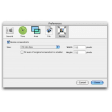
QuickSnap options

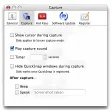
QuickSnap Options

Reviews for QuickSnap in other languages

Softonic Rating:Very good
5/10

User Rating

4 ratings
Usability
  • Currently 4/10.
Stability
  • Currently 5/10.
Installation
  • Currently 4/10.
Functionality
  • Currently 4/10.
Appearance
  • Currently 5/10.

Download stats

Are you the developer of QuickSnap?

If your program has received a Softonic rating, feel free to use the following award badge on your site or as part of any other promotional feature you may be putting together.

QuickSnap Softonic Rating

Click on the above text field to copy the necessary HTML to your clipboard and then paste it to your website. It will display your program's Softonic Rating and will link to your program page.

Any queries? Contact us if you want more info.

Close